コーディングを快適にするために
リセットCSS/CDNを用いたコーディング
リセットCSS
リセットCSSとは、ブラウザに付属しているデフォルトのスタイルを打ち消す(リセットする)CSSのことです。ブラウザ間でより標準化されたベースを作成することが目的です。リセットスタイルシートを使用すると、ブラウザのデフォルトと戦う時間を短縮できます。
リセットCSSの使い方
- リセットCSSを、自分で作る。
- ダウンロードして使う。
- CDNを使って利用する。
CDNを利用すると、1行追加するだけなので、最も便利な方法だと思います。
リセットCSSの概要
具体的に、「ブラウザに付属しているデフォルトのスタイルを打ち消す」とはどんなものなのか、具体的な内容を見てみましょう。
/* ----------------------------------------------------------------------
 reset css
---------------------------------------------------------------------- */
*,*::before,*::after{ box-sizing:border-box; word-break: break-all; }
html, body, div, span, applet, object, iframe,
h1, h2, h3, h4, h5, h6, p, blockquote, pre,
a, abbr, acronym, address, big, cite, code,
del, dfn, em, img, ins, kbd, q, s, samp,
small, strike, strong, sub, sup, tt, var,
b, u, i, center,
dl, dt, dd, ol, ul, li,
fieldset, form, label, legend,
table, caption, tbody, tfoot, thead, tr, th, td,
article, aside, canvas, details, embed,
figure, figcaption, footer, header, hgroup,
menu, nav, output, ruby, section, summary,
time, mark, audio, video
{ margin: 0; padding: 0; border: 0; outline: 0; font-size: 100%; vertical-align: baseline; }

article, aside, details, figcaption, figure, footer, header, hgroup, menu, nav, section { display: block; }
audio, canvas, video { display: inline-block; max-width: 100%; }
html { -webkit-text-size-adjust:100%; }
iframe{ max-width:100%; }
ul, ol { list-style: none; }
blockquote, q { quotes: none; }
blockquote:before, blockquote:after, q:before, q:after { content: ''; content: none; }
a:focus { outline: none; }
ins { text-decoration: none; }
mark { font-style: italic; font-weight: 600; }
del { text-decoration: line-through; }
abbr[title], dfn[title] { border-bottom: 1px dotted; cursor: help; }
table { border-collapse: collapse; border-spacing: 0; width: 100%; }
hr { display: block; height: 1px; border: 0; border-top: 1px solid #ccc; margin: 1em 0; padding: 0; }
button, input, select, textarea { outline: 0; font-size: 100%; box-sizing: border-box; }
input, textarea { background-image: -webkit-linear-gradient(hsla(0,0%,100%,0), hsla(0,0%,100%,0)); -webkit-appearance: none; border-radius:0; }
input[type="checkbox"] { -webkit-appearance: checkbox; }
input[type="radio"] { -webkit-appearance: radio; }
button::-moz-focus-inner, input::-moz-focus-inner { border: 0; padding: 0; }
.clearfix::after { display:block; clear:both; content:""; }
代表的なリセットCSS
destyle.css
https://nicolas-cusan.github.io/destyle.css/
かなり強力なリセットCSSで、初期設定のスタイルをほぼ全て打ち消してくれるCSSです。まっさらな状態からCSSを書けます。
<!-- CDNから読み込む例 -->
<link rel="stylesheet" href="https://unpkg.com/destyle.css/destyle.css">
destyle.cssの特徴
・全てのスタイルをほぼリセットしている。
・box-sizing: border-box;の記述がある。
modern.css
モダンブラウザに適切なデフォルトのリセットCSS
https://piccalil.li/blog/a-more-modern-css-reset
Normalize.css
ブラウザ間の差を「調整」しつつ、デフォルトスタイルを完全には消さない。https://necolas.github.io/normalize.css
sanitize.css
normalize.cssをベースに、さらにセキュリティやアクセシビリティに配慮した調整が入っている。https://csstools.github.io/sanitize.css
The New CSS Reset
「本当に必要な部分だけをリセット」して、ブラウザのデフォルトスタイルを活かしたアプローチ。https://elad2412.github.io/the-new-css-reset
リセットCSS比較
| 特徴 | reset.css | normalize.css | sanitize.css | destyle.css |
|---|---|---|---|---|
| デフォルト削除 | 完全に削除 | 一部調整 | 一部調整 + 安全性 | ほぼ全削除 |
| フォーム対応 | 基本なし | 軽く調整 | 詳細に調整 | フォームもほぼ削除 |
| モダン向け | 旧ブラウザも考慮 | モダン中心 | モダン中心 | モダン中心、軽量 |
| コード量 | 中〜多 | 中 | 中〜多 | 少 |
リセットCSSの多くは、「余白をリセット」「各所ブロック要素にする」などが具体的な内容です。どこをどこまでリセットするか、と言うのはご自分や所属している組織の判断になると思います。
box-sizingとは
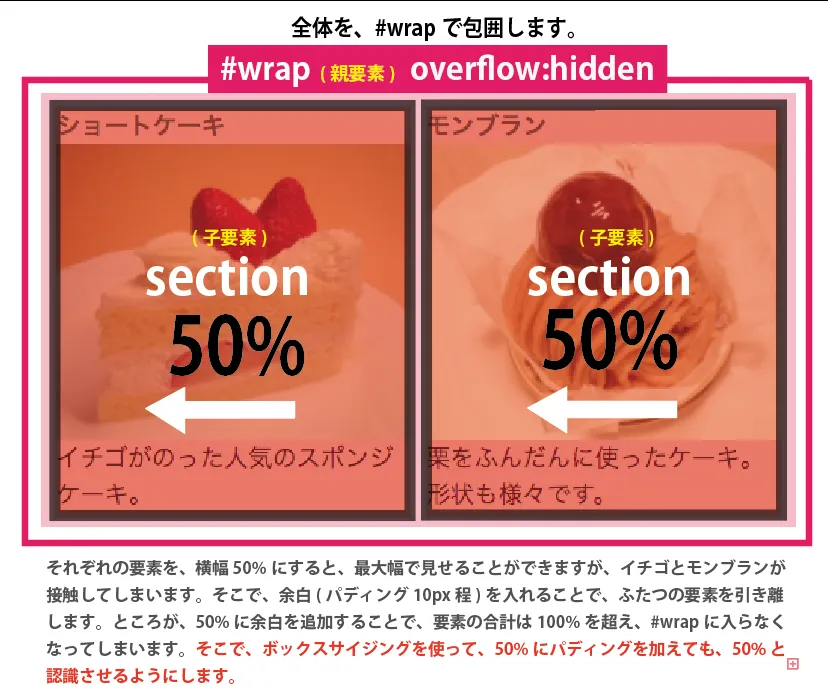
リセットCSSを厳選するに当たって、「box-sizing」の処理をどうするかが大きく関わってきます。box-sizingは、CSSで要素の幅や高さの計算方法を指定するプロパティです。特に、paddingやborderを含めて幅・高さをどう扱うかを決めるために使います。デフォルト値は、「content-box」であり、boxsizingの記述がなければ、paddingとborderは、幅に含まれて処理されます。
.example {
  width: 200px;
  padding: 20px;
  border: 5px solid black;
}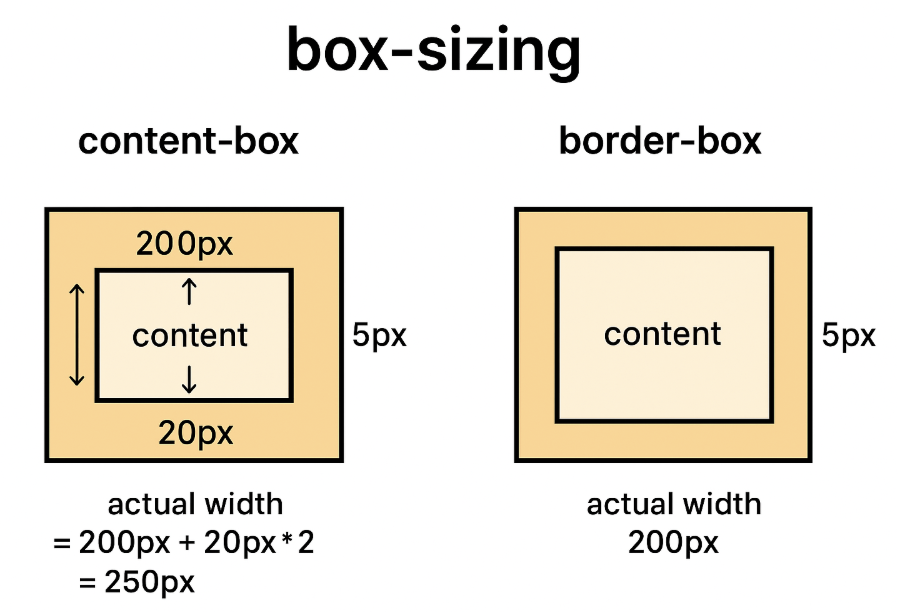
.exampleのサイズ
(width) + (padding) + (border)
200px+(20px)×2+(5px)×2= 250px
box-sizingを使うと、パディングやボーダーは幅に含まれなくなり、200pxになります。
| reset.css | 指定なし(content-boxのまま) |
|---|---|
| normalize.css | 指定なし(content-boxのまま) |
| sanitize.css | 指定なし(content-boxのまま) |
| destyle.css | 全要素を border-box に統一 |
※box-sizingは、paddingとborderのサイズを含めますが、marginは含めません。
リセットCSSの注意点
リセットCSSの使い方は、ブラウザに付属しているデフォルトのスタイルを打ち消すために使用するので、リセットCSSを最も先に記述(一番上)します。順番を間違えると、style.cssに何度書いてもリセットされてしまいます。
<head>
  <link rel="stylesheet" href="css/reset.css"><!------上に書く----->
  <link rel="stylesheet" href="css/style.css">
</head>